
Occupied Showings
Overview
This article provides an overview of how occupied showings work at Showdigs, detailing the communication with tenants and the notifications they receive regarding property showings. Our goal is to ensure a seamless experience for both property owners and tenants during the showing process.
Communication with tenants
At Showdigs, we handle most of the tenant communication on your behalf. Throughout the showing process, we will send emails and texts to the tenant at specified times to keep them informed. Below, we outline the key communication points and provide examples of each message.
Initial Notification
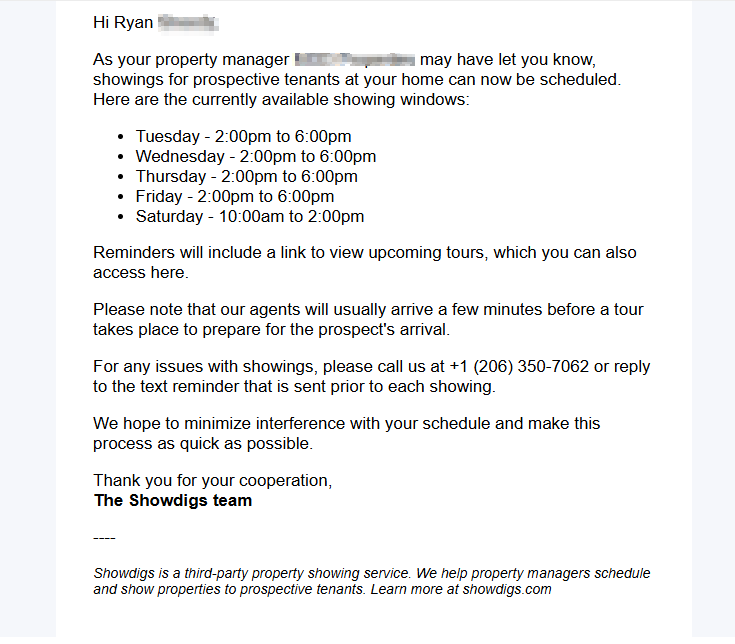
When the property is listed on the market in Showdigs, we will send an email to the tenant informing them that their residence is now available for showings. This email will include the showing windows that you have set up.
For reference, see the image for an example email:
24 Hours Before a Showing Window
** 48 hours before a showing window in Washington D.C.
One day prior to a scheduled showing window, we will send a text message to the tenant as a reminder that tours may occur during that time. An example of this message is:
Hi Bob, there's a showing window with tours planned for 123 Main St, Seattle tomorrow, between 2:00pm and 6:00pm.
View the current tour schedule at show.digs/ei9Js/t. Tours may be added or cancelled, so please check the page before the window.
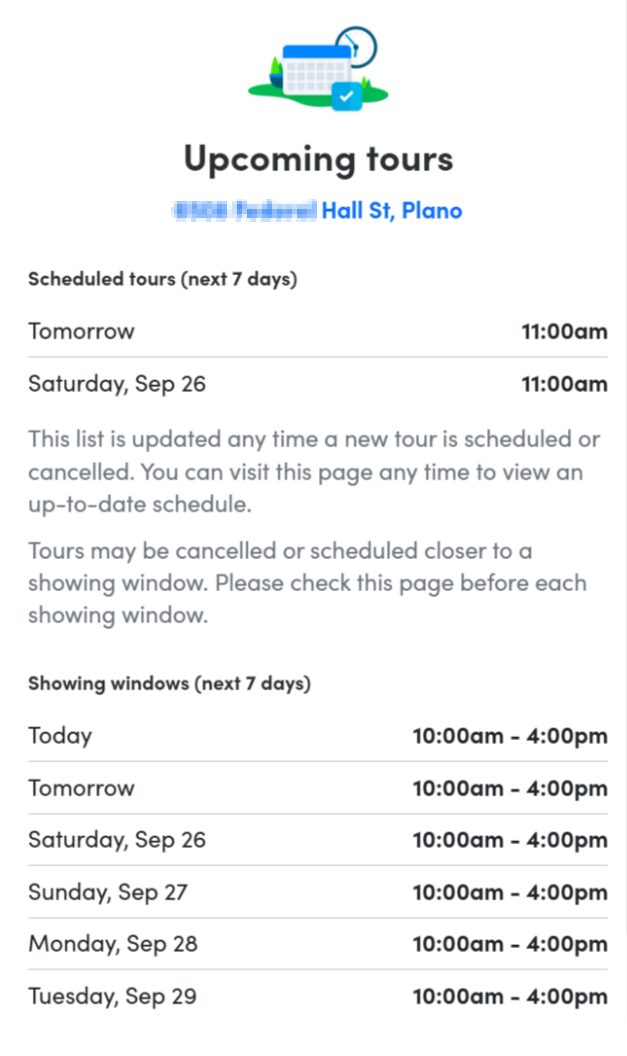
The link we provide is always available for the tenant to visit and will provide a list of specific tour times for the next 7 days, as well as upcoming showing windows for the next week; example below. It is always live, so it captures all schedules and cancellations immediately.
2 Hours Before a Showing Window
** As a courtesy to tenants, if the showing window starts before 9:00am, the reminder will be sent at the start of the showing window. Otherwise, it will be sent 2 hours before the start of the window.
If Settings > Showings > "Allow Short Notice Tours in Occupied Properties" is enabled, we'll also send a reminder 2 hours before the beginning of the showing window with the same link as the previous notice, so tenants are reminded where they can go to view specific tour times:
Hi Bob, a showing window at 123 Main St, Seattle is planned for today, 2:00pm to 6:00pm.
View the current tour schedule at show.digs/ei9Js/t. Tours may be added or cancelled, so please check the page before the window.
Choosing how early to lock occupied showing windows
Account owners can choose how Showdigs handles short-notice tours for occupied properties by adjusting the Settings > Showings > "Allow Short Notice Tours in Occupied Properties" option.
Enabled: Maximize scheduling flexibility
When this setting is enabled, prospects can continue booking tours until the short-notice cutoff, usually 2 hours before the showing window.
Tenants receive:
A text message notice before the showing window, usually 24 hours ahead
A second reminder shortly before the window with a link to the current schedule
This option is best when your team wants to keep same-day tour availability open for as long as possible.
Disabled: Give tenants earlier certainty
When this setting is disabled, Showdigs locks the showing window earlier, when the written notice is sent.
Tenants receive:
A text message notice before the showing window with a link to the current schedule, usually 24 hours ahead
No second pre-window reminder for that same window
After that earlier notice is sent, prospects can no longer book additional tours inside that showing window. This option is best when your team wants tenants to have clearer notice before the window begins.
If your team manually schedules or overrides a tour after the window has locked, you should notify the tenant directly.
How do I set up occupied showings?
Go to a specific property and click "Start Showing"
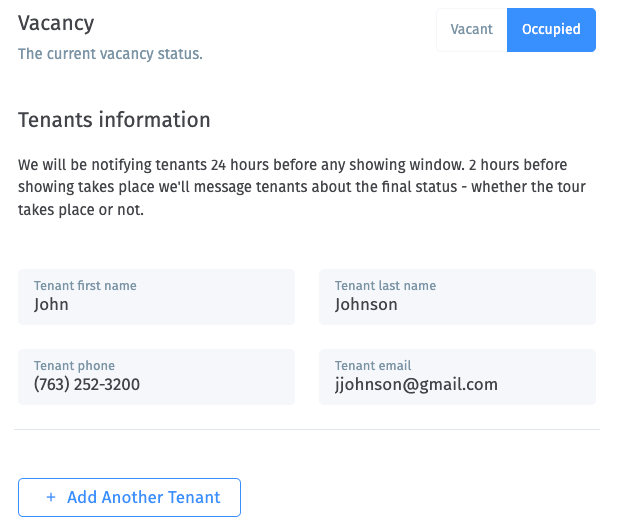
Mark the property as "Occupied" and add the tenant(s) contact details
Continue through the flow.
When you get to the Showing Schedule step, you will be able to set up multiple days and service windows. While we will notify tenants of upcoming tours, please make sure they will be prepared to for tours during those times.
Finish the flow, and you are good to go! Showdigs will schedule tours and take care of the required tenant communication, so you can focus on converting prospects into tenants.
What about tours scheduled outside of the showing windows?
How does a tour get scheduled outside of a tour window?
First, you can manually schedule a tour for any time from the "New Inquiry" flow. You can read more about that process here.
Second, you can change the showing windows after tours have been scheduled. If you change the tour windows so a previously scheduled tour no longer falls within the window, we'll keep these tours and will show you a list.
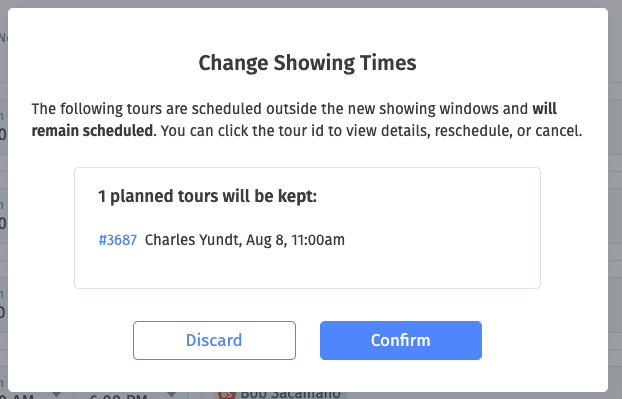
You can click on the tour id, in blue text, to view the tour and reschedule, cancel, or message the prospect.
What does that mean for tenants?
The tenants will still get our normal SMS updates. Their portal (the link we send them) will still include these "outside of the showing windows" tours - they'll see all scheduled tours for today and tomorrow.
However, they don't receive any automated notification that the showing windows changed but some tours are still scheduled for outside those hours. This is your responsibility to communicate with the tenant.