AI Leasing Agent
Overview
The agent will answer questions and engage in a text message conversation with prospects who call or message your Showdigs leasing line. Operating around the clock, the agent handles initial inquiries, answers property-specific questions, and guides interested prospects through every stage of the leasing journey.
Our AI leasing agent is uniquely trained on your specific listings and rental policies, allowing it to provide accurate, personalized responses tailored to your properties. When prospects text or call your leasing line, the agent immediately engages them with relevant information about availability, amenities, lease terms, and scheduling details. This means qualified leads receive instant attention, even outside business hours.
When a prospect asks a question that requires human expertise or judgment, the agent gracefully transitions the conversation directly to you through the Messages page. This ensures complex inquiries or nuanced discussions receive your personal attention without losing context or momentum.
The agent is also trained to recognize when someone contacting you isn't a prospective renter, whether they're a property owner, existing tenant, or someone with a different inquiry entirely. In these cases, the agent politely redirects them to your business phone number and website, keeping your leasing line focused on genuine rental prospects.
Configuration
Prompts and Context
What's already included?
We've already set up the AI agent with the basics. It knows its working for a property manager, dealing with prospective renters, and its goal is to answer their questions and facilitate successful tours. It is also aware of federal Fair Housing laws and guidelines, and knows that it's required to follow those rules.
When a conversation is happening, we also feed the agent with all of the details for your active properties. This helps it answer questions about specific properties and helps prospects find a specific property that fits their needs if they're unsure.
What do you need to add?
Business Policies
You can use the Business Policies section to add all of your own training materials. This should include as much detail as possible, so the AI agent has the information it needs to answer prospects' questions. Treat this area like you're assembling a document for a new hire. Include pet policy details, specific application procedures, and any other business-wide details that won't necessarily be covered in a specific property's listing description.
If you haven't completed these instructions yet, you'll see an example set of questions and answers. Feel free to adjust this to meet your needs - add or remove questions, change answers, etc.
Business Phone Number
The AI agent will do its best to respond to everyone, but it's instructed to specifically field questions from prospects interested in leasing a property. Anyone else will be directed to contact you on this phone number. You'll still be able to find the conversation in your Messages inbox, but the agent won't be able to provide support in these situations.
For example, if a property owner contacts your Showdigs leasing line number asking about your services, or current tenant reports a maintenance issue, the agent will let them know that it's only able to answer questions from people interested in leasing a property, and it will send them a link to your website, along with this Business Phone Number, and request they contact you there.
Automations
The AI leasing agent is ultimately a passive agent that responds when someone sends it a message. In order to get a conversation started, we've added a list of automations that we're always working on expanding.
Enabling an automation (Main Menu > Automations) allows you to have a custom message sent from your Showdigs leasing line when an event occurs. This functions as an invitation to the prospect to have a conversation, and the AI will be ready to answer any questions and help the prospect schedule and complete a successful tour.
Frequently Asked Questions
How does the agent respond to different people?
The AI Leasing Agent is trained to handle a question from just about anyone, but will handle them in different ways depending on their intent.
If the person is interested in leasing a property, but hasn't inquired yet, the agent will attempt to get the person's name and answer any questions they have, hopefully resulting in a scheduled tour. If the agent is unable to get the person's name, you'll see the conversation in the Messages inbox under their phone number.
If the person is interested in leasing a property and has already inquired, the agent will be aware of their previous inquiries and name, and will have that extra context when answering questions.
If the person is not interested in leasing a property, maybe they're a current tenant or a property owner, the AI will direct them to your website and your Business Phone Number (from the AI configuration page). You'll still find the conversation in your Messages archive.
What if the agent doesn't know the answer to a question?
If the person asks a question that the AI agent doesn't know the answer to, it will confirm the person needs to know the answer now. For example, if they're scheduling a tour and have a question about lawn mowing services, they may be able to wait to ask an agent during the tour or follow up with you afterwards. If they insist on an answer now, though, the AI will let them know they're handing off the conversation to a colleague, and will stop monitoring the conversation.
You'll find the conversation in your Messages inbox, unread, waiting for your reply. After replying, you can re-enable the AI Leasing Agent if you wish.
If you're in Showdigs regularly, you'll see a red dot next to the Messages item in the main menu, alerting you to unread messages. If you'd like to also receive an email notification, you should enable the "Send conversation updates for new, unread messages" from your Showdigs profile.
Where are all of the conversations?
When the AI agent is enabled for a conversation, and it doesn't require any intervention from a human, the conversation will stay in the Archive. This keeps your inbox free of clutter, and focused on conversations that require your input. If you'd like to review the agent's responses, simply go to the Archive.
If the AI agent needs help, it will let the prospect know it's escalating the conversation, turn itself off for the conversation, and will move the conversation into your Inbox. You'll see a new unread notification in the main menu, and will receive an email notification if you've enabled those in your profile.
If the AI agent is off for a conversation and a prospect sends a message, it will automatically move into your Inbox. You can keep it in your Inbox or manually move it to Archive to keep your Inbox clean. Either way, when the prospect responds, the conversation will move back to your Inbox.

How can I get an overview of the conversations?
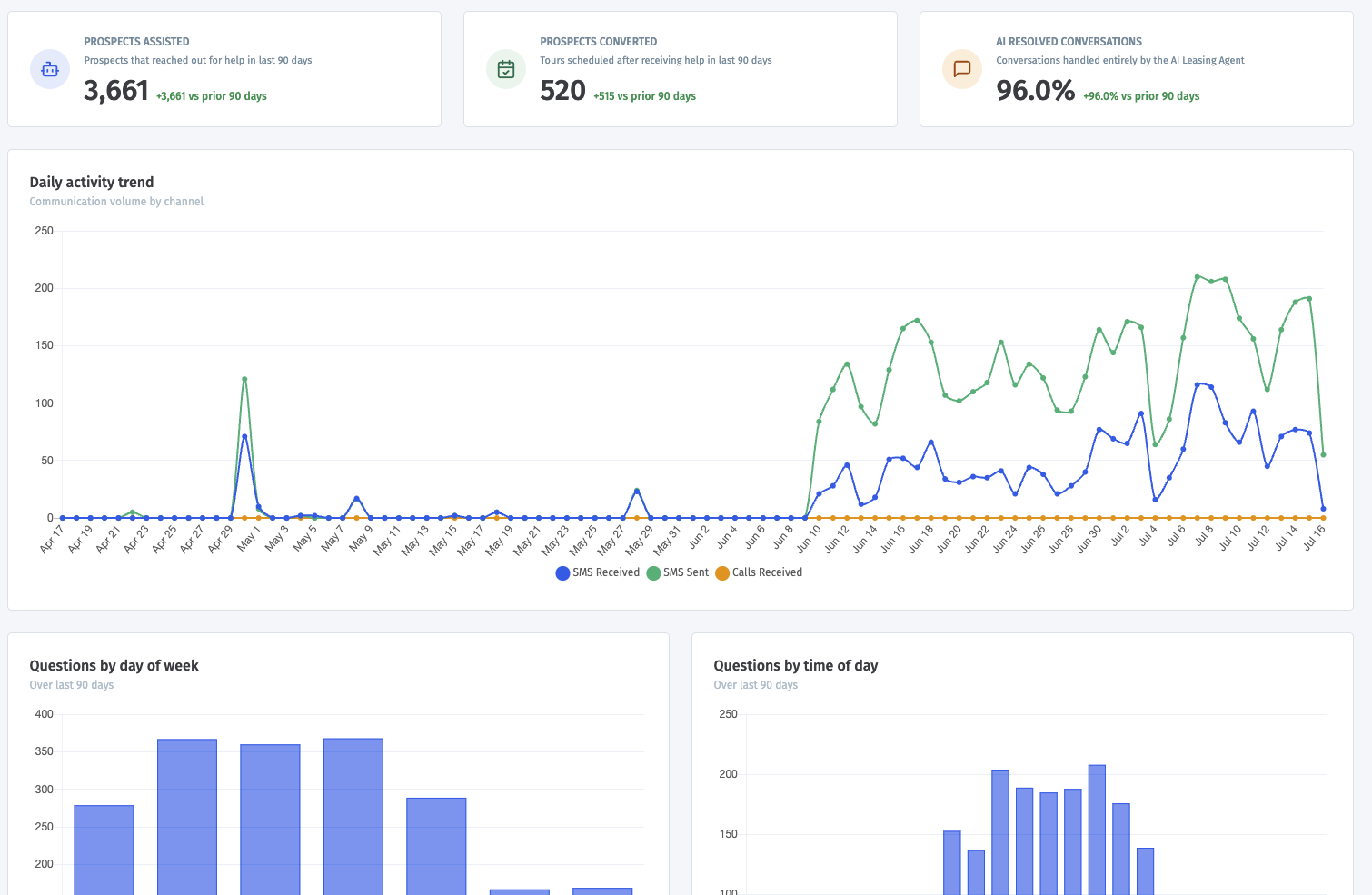
You can find the AI Leasing Agent dashboard from the Dashboards page. It shows how your AI Leasing Agent is performing over time. Use it to review daily activity, call volume and duration, and when prospects are asking questions by day of week or time of day. This helps you understand engagement trends and spot patterns in prospect communication.